

In the sphere of industrial automation, the Programmable Logic Controller (PLC) remains a pivotal component, orchestrating complex processes with precision and reliability. As the industry continues to evolve, the demand for proficient PLC programming expertise escalates. For novices embarking on this technical journey, selecting the appropriate PLC programming software—an essential category of automation software—is paramount. This discourse endeavors to elucidate the top PLC programming software tailored for beginners, underscored by a rigorous analysis of their features, usability, and pedagogical value. Across industries, programmable logic controllers are central to robust control and learning.
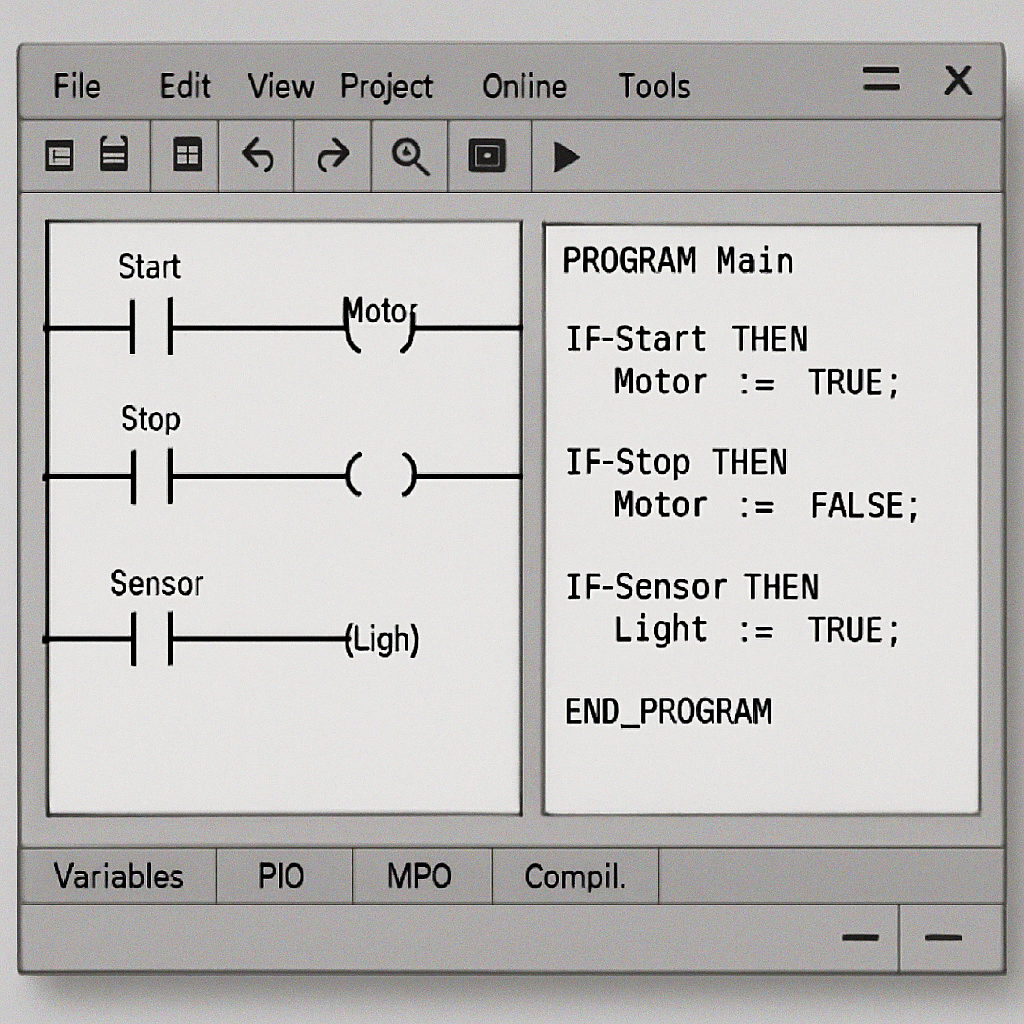
At its core, PLC programming software serves as the conduit between human operators and the robust hardware of PLCs, facilitating the creation, testing, and deployment of automation sequences. As automation software, it acts as the brain behind industrial automation, transforming human instructions into machine actions. It enables the seamless translation of intricate algorithms into machine-readable formats, typically employing ladder logic, structured text, or function block diagrams for programmable logic controllers.
Basic Functions and Objectives
PLC programming software is designed to perform several critical functions. Firstly, it provides an environment where users can design, simulate, and test automation processes before deploying them in real-world scenarios. This testing environment is crucial as it allows users to troubleshoot and refine their logic without risk. Secondly, the software serves as a bridge that translates human logic into a format that PLCs can execute, ensuring that the programmed sequences achieve the desired outcomes in industrial settings. In this way, the right automation software shortens feedback loops and improves reliability.
Programming Languages in PLC Software
The versatility of PLC programming software is often demonstrated through its support for various programming languages. Ladder logic, for instance, is widely used due to its visual simplicity, resembling electrical relay logic diagrams. Structured Text, akin to high-level programming languages, offers robust functionality for complex algorithms. Function Block Diagram, with its graphical programming approach, facilitates the creation of control systems using interconnected blocks, each representing a specific function or operation. These languages are foundational for programming programmable logic controllers across brands.
Importance of User-Friendly Design
For beginners, the intuitive design and comprehensive support of the software are crucial determinants of their learning curve. A user-friendly design allows novices to focus on learning the core principles of PLC programming without being overwhelmed by complex interfaces. The software should ideally provide clear visualizations of logic operations and offer streamlined workflows that simplify the programming process, fostering an environment conducive to experimentation and learning. Well-designed automation software reduces friction and encourages exploration.
Factors to Consider When Choosing PLC Programming Software
Choosing the right PLC programming software involves evaluating multiple factors that can significantly impact the learning experience and future capabilities of the user. For anyone comparing plc programming software, weigh usability and learning resources alongside hardware compatibility and long-term growth.
User Interface and Usability
The user interface of PLC programming software significantly influences the learning experience of novices. Intuitive navigation, clear visualization of logic operations, and streamlined workflows are essential attributes that alleviate the cognitive load on beginners. A well-designed interface can make complex processes more approachable, allowing users to focus on understanding logic and control rather than grappling with the software itself.
Simplification and Accessibility
An accessible user interface is characterized by simplicity and clarity, where functions are easy to locate and use. This simplicity reduces the intimidation factor often associated with learning new software and empowers beginners to confidently explore different features. For instance, icons should be logically arranged, and the software should include tooltips and help guides to assist users in navigating through various functions.
Visual Representation of Logic
The software should provide an environment conducive to experimentation and learning, with minimal obfuscation of core functionalities. Visual representation of logic, such as ladder diagrams, can help users comprehend and construct control processes more effectively. By visualizing the logic flow, beginners can quickly grasp how different components interact and identify any potential errors or inefficiencies in their design.
Workflow Optimization
Streamlined workflows are integral to reducing the time and effort required to perform repetitive tasks. The software should offer customizable templates and shortcuts that allow users to automate routine operations, thereby enhancing productivity. Workflow optimization not only improves efficiency but also allows beginners to focus more on learning and less on navigating the software. Many modern automation software suites include libraries and macros to accelerate common tasks.
Learning Resources and Community Support
Access to extensive learning resources, such as tutorials, documentation, and forums, is indispensable for beginners. Software that fosters an active community of users can offer invaluable peer support and shared insights, expediting the troubleshooting process and enhancing the overall learning experience. Communities centered on programmable logic controllers often share reusable examples and best practices.
Comprehensive Tutorials and Documentation
Tutorials and documentation serve as foundational pillars for learning any new software. They provide step-by-step guidance on using the software’s features, from basic operations to more advanced functions. Comprehensive documentation should include clear explanations of concepts, examples, and best practices, catering to different learning paces and styles.
Forums and Peer Support
An active community forum is a treasure trove of knowledge, offering real-world insights and solutions to common challenges faced by beginners. Engaging with a community can provide moral support and motivation, as users share experiences, successes, and setbacks. Peer support often leads to collaborative problem-solving, where beginners can ask questions and receive guidance from experienced users.
Webinars and Online Courses
Webinars and online courses are excellent supplements to traditional learning resources, providing interactive platforms for knowledge exchange. These sessions often feature industry experts who share practical tips, strategies, and advanced techniques. Recorded sessions allow learners to revisit complex topics at their convenience, reinforcing their understanding and application of the software.
Compatibility and Scalability
Beginners should opt for PLC programming software that is compatible with a wide array of PLC hardware, ensuring the longevity of their skills as they transition to more advanced systems. The software should also support scalability, enabling users to tackle increasingly complex automation projects as their proficiency grows. Broad compatibility with programmable logic controllers from multiple vendors protects portability of skills.
Hardware Compatibility
The ability of the software to interface with various PLC hardware is crucial for practical application. Beginners should choose software that supports a broad range of PLC brands and models, allowing them to apply their skills across different platforms and industries. This compatibility ensures that learners are not confined to a single brand or system, broadening their professional prospects.
Scalability for Advanced Projects
As users gain confidence and proficiency, they should be able to scale their projects to address more complex automation challenges. Scalable software can accommodate growing project sizes and complexity, providing advanced features and tools that meet the demands of sophisticated applications. This scalability ensures that beginners can continue to use the same software as their skills evolve.
Future-Proofing Skills
Investing in software that is regularly updated with new features and enhancements ensures that users remain at the forefront of technological advancements. Future-proof software adapts to industry changes, incorporating emerging trends and technologies that keep learners relevant and competitive in the job market. This adaptability is essential for long-term career growth in industrial automation, especially as automation software ecosystems continue to expand.
Top PLC Programming Software for Beginners
In this section, we explore some of the top PLC programming software options that offer beginner-friendly features while providing robust functionality for future growth.
Siemens TIA Portal
The Siemens Totally Integrated Automation (TIA) Portal stands as a paragon of comprehensive industrial control solutions. For beginners, TIA Portal offers a cohesive environment for PLC programming, visualization, and configuration. Its user-friendly interface is augmented by a plethora of learning modules and an extensive library of pre-built functions, positioning it as a flagship automation software suite.
Unified Platform for Integration
TIA Portal provides a unified platform that integrates PLC, HMI, and SCADA systems, simplifying the development process for beginners. This integration allows users to manage multiple aspects of automation within a single interface, reducing the complexity associated with handling separate systems. The cohesive environment fosters a more streamlined workflow, enabling beginners to focus on learning and innovation.
Extensive Online Community and Support
An active online community supports TIA Portal users, offering forums, tutorials, and expert advice. This network of users and professionals facilitates collaborative learning and problem-solving, allowing beginners to access a wealth of shared knowledge and experience. The support network also includes official Siemens resources, providing comprehensive documentation and training materials.
Advanced Diagnostics and Simulation Tools
TIA Portal is equipped with advanced diagnostics and simulation tools that allow users to test and troubleshoot their programs before deployment. These tools provide real-time feedback, helping beginners identify and rectify errors early in the design process. The simulation capabilities enable risk-free experimentation, fostering a deeper understanding of automation principles and practices.
Allen-Bradley RSLogix 500
RSLogix 500, developed by Rockwell Automation, is another formidable contender in the realm of PLC programming software. Designed primarily for Allen-Bradley PLCs, it is renowned for its intuitive ladder logic editor and robust simulation capabilities, making it an ideal choice for beginners. It integrates smoothly into Rockwell’s broader automation software ecosystem.
Intuitive Ladder Logic Editor
The ladder logic editor in RSLogix 500 is designed for ease of use, with a clean interface that simplifies the creation and modification of control logic. The editor provides visual representations of control processes, enabling beginners to quickly grasp and construct automation sequences. This intuitive design reduces the learning curve, allowing users to focus on mastering programming concepts.
Integrated Simulation and Testing Environment
RSLogix 500 includes an integrated simulation and testing environment that allows users to validate their logic in a virtual setting. This feature enables beginners to experiment with different scenarios and refine their programs without risk, building confidence and competence in their programming skills. The simulation environment provides detailed feedback, aiding in the identification and resolution of potential issues.
Access to Rockwell Automation’s Support Network
Rockwell Automation offers a comprehensive support network for RSLogix 500 users, including forums, technical support, and training resources. This support infrastructure provides beginners with access to expert guidance and assistance, facilitating a smoother learning experience. The extensive range of resources ensures that users can find answers to their questions and solutions to their challenges.
Mitsubishi GX Works
Mitsubishi’s GX Works software provides a versatile platform for PLC programming, featuring support for multiple programming languages and an intuitive graphical interface. Its modular design allows beginners to gradually expand their capabilities as they delve deeper into the intricacies of PLC programming.
Support for Multiple Programming Languages
GX Works supports ladder logic, structured text, and function block diagrams, offering beginners flexibility in choosing the language that best suits their learning style and project requirements. This versatility enables users to explore different programming approaches and develop a comprehensive understanding of PLC programming techniques.
Modular Architecture for Scalability
The modular architecture of GX Works allows users to expand their projects as their skills and needs grow. Beginners can start with simple projects and gradually incorporate more complex features and functions, scaling their applications to address more sophisticated automation challenges. This scalability ensures that users can continue to use the software as they advance in their careers.
Extensive Online Resources and Documentation
Mitsubishi provides extensive online resources and documentation for GX Works users, including tutorials, manuals, and technical guides. These resources offer step-by-step instructions and best practices for using the software, supporting beginners in their learning journey. The availability of comprehensive documentation ensures that users can find the information they need to overcome challenges and achieve their goals.
Omron CX-Programmer
Omron’s CX-Programmer offers a robust suite of tools for PLC programming, characterized by its user-friendly interface and comprehensive support for various PLC models. Beginners will appreciate the software’s extensive simulation capabilities and real-time monitoring features. It integrates well with Omron’s family of programmable logic controllers for seamless deployment.
Intuitive Ladder Diagram Editor
The ladder diagram editor in CX-Programmer provides a visual interface for creating and editing control logic. This intuitive design simplifies the programming process for beginners, allowing them to focus on understanding and applying automation principles. The editor includes features such as drag-and-drop functionality and real-time error checking, enhancing the user experience and reducing the likelihood of errors.
Real-Time Simulation and Monitoring
CX-Programmer offers real-time simulation and monitoring capabilities, enabling users to test and validate their programs in a virtual environment. This feature provides immediate feedback on the performance of the control logic, helping beginners identify and resolve issues before deployment. The real-time monitoring capabilities also allow users to observe the behavior of their programs in real-world scenarios, fostering a deeper understanding of automation processes.
Compatibility with a Wide Range of Omron PLCs
The software’s compatibility with a wide range of Omron PLC models ensures that beginners can apply their skills across different platforms and industries. This flexibility allows users to gain experience with various types of PLCs, broadening their knowledge and enhancing their employability. The ability to work with different hardware systems prepares beginners for diverse career opportunities in industrial automation.
Pedagogical Value of PLC Programming Software
The pedagogical value of PLC programming software lies in its ability to facilitate experiential learning. Beginners benefit from a hands-on approach, where theoretical knowledge is reinforced through practical application. Simulation tools, in particular, allow novices to test their programs in a risk-free environment, fostering a deeper understanding of automation concepts and the behavior of programmable logic controllers.
Experiential Learning Through Practice
PLC programming software provides a platform for experiential learning, where users can apply theoretical concepts in practical scenarios. By engaging with the software, beginners can experiment with different programming techniques, gaining insights into the behavior and performance of their control logic. This hands-on approach reinforces learning and builds confidence in applying automation principles to real-world applications.
Simulation Tools for Risk-Free Experimentation
Simulation tools are invaluable for beginners, allowing them to test and refine their programs without the risk of damaging equipment or causing operational disruptions. These tools provide a virtual environment where users can explore different scenarios, experiment with various logic sequences, and observe the outcomes. The ability to test programs safely enhances understanding and encourages innovation, as learners can explore creative solutions to complex automation challenges.
Reinforcing Theoretical Knowledge
By integrating theoretical knowledge with practical application, PLC programming software helps users develop a comprehensive understanding of automation concepts. As beginners apply their learning to real-world scenarios, they can identify gaps in their knowledge and seek further clarification or study. This iterative process of theory and practice fosters a deeper understanding of PLC programming and prepares users for more advanced challenges in their careers.

by Herlambang Tinasih Gusti (https://unsplash.com/@tinasihgusti)
In conclusion, the journey into PLC programming is significantly influenced by the choice of software. For beginners, selecting a platform that balances user-friendliness with robust functionality is essential. Siemens TIA Portal, Allen-Bradley RSLogix 500, Mitsubishi GX Works, and Omron CX-Programmer represent exemplary choices, each offering unique advantages tailored to novice programmers. As the field of industrial automation continues to expand, the foundational skills acquired through these software tools will serve as a gateway to more sophisticated and rewarding opportunities in the realm of PLC programming within broader automation software environments.
By investing in the right PLC programming software, beginners can embark on a transformative learning journey, unlocking the potential to innovate and excel in the dynamic world of industrial automation. The skills and knowledge gained through these tools not only prepare users for immediate challenges but also equip them with the capabilities to adapt to future advancements in the industry and the evolving landscape of programmable logic controllers, ensuring long-term career success and growth.
Q&A
Question: What makes PLC programming software truly beginner-friendly?
Short answer: A beginner-friendly tool combines an intuitive interface with clear visualizations (like ladder diagrams), streamlined workflows (templates, libraries, and macros), and built-in simulation/testing. It should also offer accessible help (tooltips, guides), comprehensive tutorials and documentation, and an active user community so novices can learn, troubleshoot, and iterate quickly without getting lost in the interface.
Question: Which PLC programming language should I start with, and when should I explore others?
Short answer: Start with Ladder Logic because its visual, relay-style diagrams make control flow easy to grasp. As you grow, add Function Block Diagram (great for building systems from interconnected functional blocks) and Structured Text (best for complex algorithms and more “code-like” logic). Learning all three broadens your versatility across projects and platforms.
Question: Can I learn PLC programming without owning physical PLC hardware?
Short answer: Yes. Most beginner-oriented tools include simulation and testing environments that let you design, run, and troubleshoot logic virtually. Simulation provides immediate, risk-free feedback, shortens the trial-and-error cycle, and helps you solidify concepts before deploying to real equipment.
Question: How should a beginner choose among TIA Portal, RSLogix 500, GX Works, and CX-Programmer?
Short answer: Match the software to your likely hardware ecosystem and learning goals:
- Siemens TIA Portal: Unified PLC/HMI/SCADA platform with strong diagnostics, simulation, and a large community—ideal if you want an integrated environment.
- Allen-Bradley RSLogix 500: Renowned for an intuitive ladder editor and integrated simulation—great if you’re targeting Allen-Bradley PLCs.
- Mitsubishi GX Works: Supports Ladder, FBD, and Structured Text with a modular, scalable design—good for flexible language learning and gradual project growth.
- Omron CX-Programmer: User-friendly ladder editing with real-time simulation/monitoring and broad Omron PLC coverage—suited for hands-on validation and deployment within Omron systems.
Question: Why are compatibility, scalability, and future-proofing so important for beginners?
Short answer: Broad hardware compatibility keeps your skills portable across brands and industries. Scalable tools let you progress from simple to complex projects without switching platforms. Regularly updated, “future-proof” software helps you stay aligned with evolving technologies, protecting your learning investment and supporting long-term career growth.